

Ugee 1910B Digital Pen Tablet Display Drawing Monitor
XP-PEN Artist12 11.6 Inch FHD Drawing Monitor for Artists and Illustrators with 8192 Pressure Sensitivity and Glove Supp
Description
Your Product'S Main Highlights
Universal Compatibility: Our XP-PEN Artist12 Drawing Tablet supports Windows 7/8/10/11, Mac 10.10 or later, and Linux. It is compatible with Photoshop, Illustrator, SAI, Painter, MediBang, Clip Studio, and more. Simply connect it to your computer for seamless performance in digital drawing, animation, sketching, photo editing, and 3D sculpting.
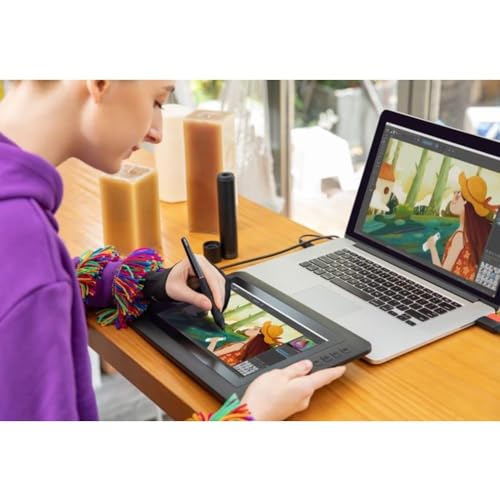
11.6 HD IPS Display: The latest XP-PEN Artist12 features a 11.6 HD IPS display with a 1920x1080 resolution and 72% NTSC(100% sRGB) color gamut. This provides vivid images and vibrant colors, offering extreme detail and stunning clarity for your artwork. It comes with an anti-reflective screen protector pre-installed for a clear and distraction-free view. The slim touch bar allows for programming to zoom in and out, or scroll up and down. Customize the 6 shortcut keys via the XP-PEN driver to align with your preferred software.
Battery-Free Stylus: Enjoy a traditional pencil-like feel with the XP-PEN advanced P06 passive pen. It features a hexagonal design, a non-slip, tack-free flexible silicone grip, and a partial transparent pen tip. The stylus also comes with an eraser at the end, making it highly efficient and versatile. It includes 8 replacement pen nibs for longevity.
Ideal for Online Education and Remote Work: Perfect for online education and remote work, the XP-PEN Artist12 can serve as an extended display when working from home. Easily share your handwritten notes on the screen directly, making it convenient for teachers and students to write and edit complex equations. It is compatible with XSplit, Zoom, Twitch, Microsoft Teams, ezTalks Webinar, Idroo, Scribbiar, wiziQ, and more.
Warranty and Support: Enjoy a one-year warranty and lifetime technical support on all XP-PEN drawing pen tablets/displays. Register your XP-PEN Artist12 on the XP-PEN website to receive exclusive software offers like ArtRage 5, openCanvas, or Explain Everything. Ensure your laptop or desktop has HDMI and USB-A ports for connection, or use a converter like Thunderbolt to HDMI if needed.